








Do stale shares get paid?
It depends on the reward scheme. On HeroMiners a stale share counts under PROP and is not paid under PPS+. In solo mining only a block pays.
Are stale shares paid?
It depends on the reward scheme. A stale share is valid work that reached the pool after the network had moved to the next block.
On HeroMiners the answer is:
- PROP: a stale share counts toward your share of the block. It counts in full while your stale rate stays in the normal range.
- PPS+: a stale share is not paid.
- Solo: no share is paid, stale or not. Only a block pays.
A HeroMiners pool runs either PROP or PPS+. The scheme in force is shown live on the pool statistics.
What makes a share stale?
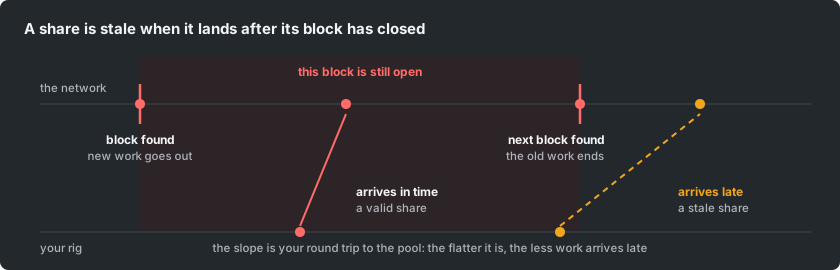
Every share is an attempt at one block: the block the network is building right now. When any miner in the world finds that block, every pool sends its miners new work.
A share that is still travelling at that moment arrives late. It is correct work for a block that already has a winner, so it can no longer find that block.
So a stale share is late, not wrong. Your hardware did the work correctly.
How does each reward scheme treat a stale share?
| Scheme | A stale share | Why |
|---|---|---|
| PROP | Counts toward your share of the block | A block is shared by the work each miner sent in, and late work is still work |
| PPS+ | Is not paid | Each share is paid a fixed amount as it arrives, and a late share can no longer find a block |
| Solo | No share is paid | You are paid for the blocks you find, not for shares |
Under PROP there is one limit. A stale share takes its part of the block from the other miners. So a wallet with a stale rate far above normal has its stale shares credited at a reduced rate. At a very high rate they are not credited at all.
Under PROP, the stale count on your dashboard tells you where you stand. It shows your stale percentage and says whether your stale shares are credited in full.
In solo mining a stale share costs you only a chance. If that share was the one that solved the block, the block is lost. That is rare, because very few shares solve a block.
One case is the same under every scheme. A share that arrives very late is rejected, and your miner shows a "job not found" reply. It earns nothing, and it is counted as a stale share on your dashboard.
How do stale, rejected and orphaned differ?
These three words are often used as if they meant the same thing. They are different events with different causes.
| Term | What happened | Paid? |
|---|---|---|
| Stale share | Valid work that reached the pool after the network had moved to the next block | Depends on the reward scheme |
| Rejected share | Work that failed the pool's check: wrong algorithm, below your assigned difficulty, malformed or a duplicate | No |
| Orphaned block | A whole block the pool found that lost the race to another block at the same height | No, that block earns nothing |
A small number of stale shares needs no action. Rejected shares in any number mean something in your setup is wrong and should be fixed.
An orphaned block is luck. Nothing you do on a rig changes it.
What stale rate is normal?
It depends on the coin. A share goes stale when a new block arrives while the share is on its way to the pool. So the expected rate is about your round trip to the pool divided by the coin's block time.
| Round trip to the pool | 12-second blocks | 3-minute blocks | 10-minute blocks |
|---|---|---|---|
| 50 ms | 0.4% | 0.03% | 0.01% |
| 100 ms | 0.8% | 0.06% | 0.02% |
| 200 ms | 1.7% | 0.11% | 0.03% |
Mining software adds a little on top, because it needs a moment to switch to new work.
A coin with fast blocks always shows more stale shares than a slow one at the same distance. So compare your rate with other miners of the same coin, never with another coin.
Watch the trend more than the number. A steady low rate is the cost of distance. A rate that climbs week after week means something changed at your end.
How do you lower your stale rate?
- Mine on the closest region. This matters most, because your round trip to the pool decides how much work arrives late. Run the latency test instead of guessing from the map.
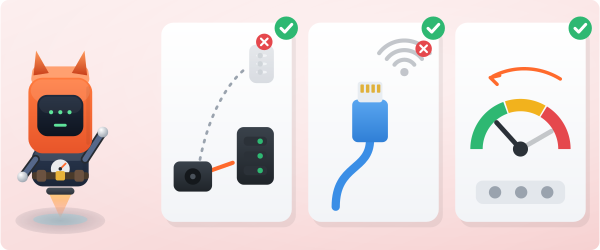
- Use a wired connection. Wi-Fi adds delay and jitter, which is delay that keeps changing. Jitter causes bursts of stale shares.
- Ease off settings that push a card too hard. A rig that lags is slow to switch to new work, and the shares it sends for the old work are stale.
- Find the one bad worker. A single rig on a poor link can lift the rate of your whole wallet. Your worker list shows a stale count for each rig, so you fix one machine.
- Check the path, not only the rig. A busy home router adds delay. So does an internet provider that sends your traffic a longer way at peak hours.
What if every rig goes stale at once?
Then the cause is the path between you and the region, not a rig. Typical causes are a route change at your internet provider, congestion or a cable maintenance window.
The sign is a jump on all your rigs at the same time. One rig that drifts away from the others is a different problem.
Run the latency test again before you touch any hardware. If another region is now closer in practice, move to it, and move back later.